The 8 Essential Music Elements: A Blueprint for AI Song Creation
Understanding music elements is no longer just for classical composers or conservatory students. In the age of generative audio, where tools like Suno and Udio turn text into tracks, mastering these fundamental building blocks is the difference between a generic output and a professional-sounding hit.
Music elements are the individual components—the DNA—that make up a piece of music. By deconstructing sound into specific categories like Rhythm, Melody, Harmony, Dynamics, Timbre, Texture, Form, and Pitch, creators can engineer precise prompts that guide AI models with surgical accuracy.
This guide explores these elements in depth, analyzes how they interact to create emotional impact, and provides best practices for using them in prompt engineering.
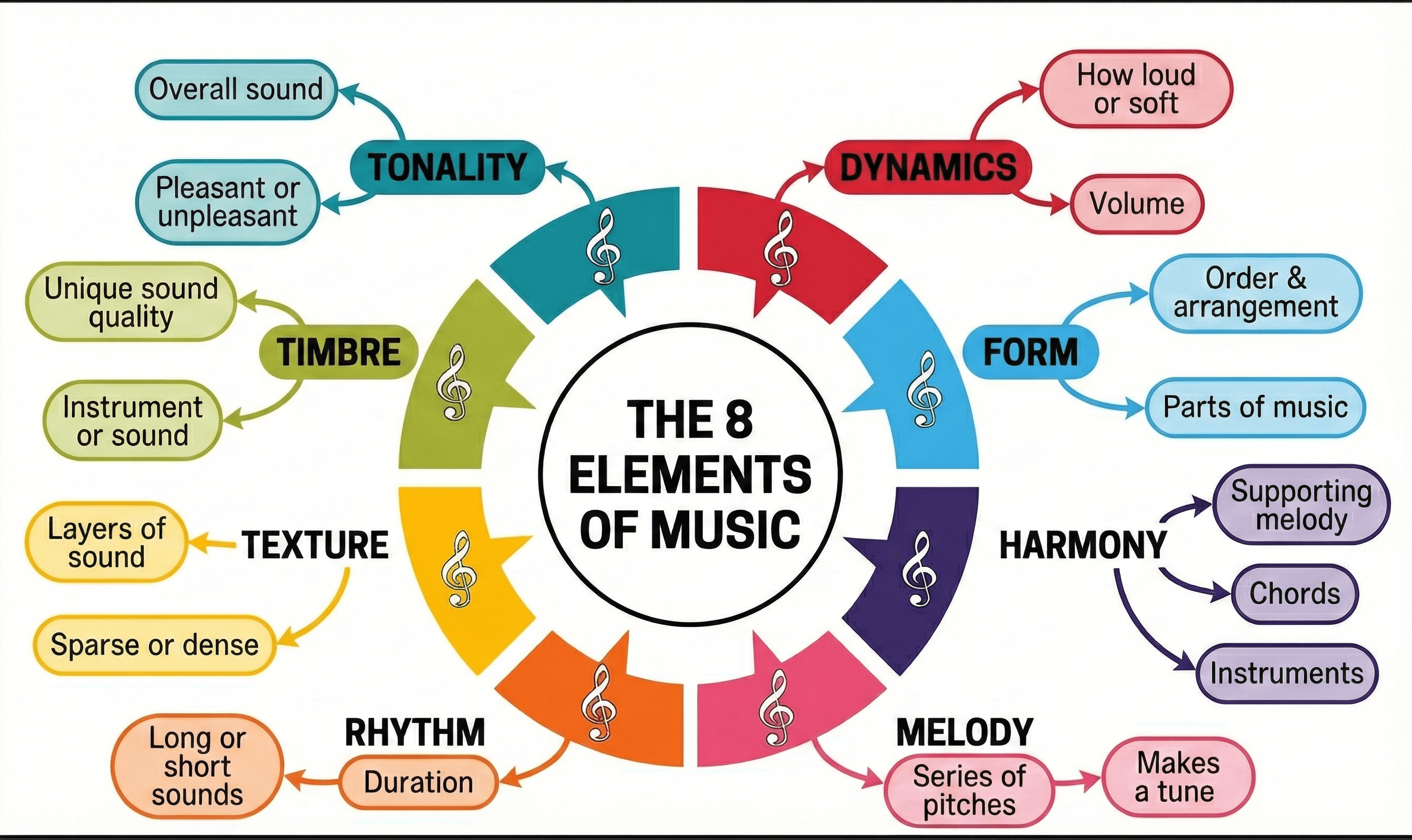
Part 1: Deconstructing the 8 Core Music Elements
To communicate effectively with an AI music generator, you must speak its language. These models are trained on vast datasets labeled with these specific musical parameters.
1. Rhythm (The Pulse of the Track)
Rhythm is the placement of sounds in time. It is the engine that drives the music forward. In AI prompting, rhythm is often the first thing you define to set the energy.
- Definition: The pattern of regular or irregular pulses caused in music by the occurrence of strong and weak melodic and harmonic beats.
- Key Components:
- Tempo: The speed of the music (BPM). AI prompts often use descriptors like "very slow tempo," "medium tempo," or "fast tempo".
- Meter: How beats are grouped (e.g., 4/4 time vs. 3/4 waltz time).
- Groove: The "feel" of the rhythm, such as "swing feel" or "driving drum beat".
2. Melody (The Linear Voice)
Melody is a linear sequence of notes the listener perceives as a single entity. It is the "tune" you hum.
- Definition: The horizontal aspect of music; a succession of single pitches that creates a musical idea.
- AI Application: To avoid meandering AI generations, you can specify melodic characteristics like "catchy hook," "soaring topline," or "descending melody".
- Phrasing: You can control how the melody is delivered using tags like "legato phrasing" (smooth) or "staccato" (detached).
3. Harmony (The Vertical Depth)
Harmony occurs when two or more notes are played simultaneously. It supports the melody and dictates the mood.
- Definition: The vertical aspect of music, involving chords and chord progressions.
- Emotional Coding:
- Major Chords: Generally create a happy, bright, or triumphant mood.
- Minor Chords: Tend to create a darker, sad, or melancholic feel.
- Complexity: Prompts can request "complex chords" (Jazz) or "power chords" (Rock) to define the genre.
4. Pitch (The Frequency Range)
Pitch refers to the highness or lowness of a sound. In AI music, this element is crucial for defining the range of instruments and vocals.
- Definition: The position of a single sound in the complete range of sound.
- AI Prompting Strategy:
- Vocals: Specify "deep baritone" for low pitch or "operatic soprano" for high pitch to prevent the AI from defaulting to a mid-range voice.
- Instruments: Use terms like "sub-bass" or "shimmering highs" to occupy specific frequency ranges.
5. Timbre (The Tone Color)
Pronounced "tam-ber," Timbre is the unique quality of a sound that distinguishes one instrument from another, even when playing the same pitch.
- Definition: The "color" or texture of the sound wave (e.g., bright, dark, brassy, reedy, harsh).
- Descriptive Power: This is the most vital element for defining specific sounds. Examples include "warm, vintage, analog sound" versus "distorted, heavily saturated vocals".
- Specific Instruments: Naming specific instruments like "Jangly guitars" or "Brushed drums" sets the timbre immediately.
6. Dynamics (The Volume Intensity)
Dynamics refer to the variation in loudness between notes or phrases. They create drama and contrast.
- Definition: The relative loudness or softness of a sound.
- Creating Narrative: AI tracks can sound flat without dynamic instruction. Use terms like "gradual crescendo" (getting louder) or "soft pianissimo intro" to create an emotional journey.
7. Texture (The Density)
Texture describes how many layers of sound are heard at once and how they relate to each other.
- Definition: The overall quality of the sound in a piece, determined by the number of voices and their interaction.
- Types for AI:
- Sparse/Thin: "Minimalist," "Stripped-down," "Acoustic guitar and voice only."
- Dense/Thick: "Wall of sound," "Full orchestra," "Layered synths," "Complex polyrhythms".
8. Form (The Structure)
Form is the architectural blueprint of the song. It organizes the other elements into a coherent whole.
- Definition: The structural arrangement of a musical composition (e.g., Verse-Chorus structure).
- Control Mechanism: In tools like Suno, Form is controlled via metatags in the lyrics box, such as
[Intro],[Verse],[Chorus],[Bridge], and[Outro].
Part 2: The Psychology of Sound – How Elements Create Mood
Beyond simple definitions, understanding the psychological impact of music elements allows you to reverse-engineer the perfect prompt. When users search for "sad music" or "energetic workout music," they are actually searching for a specific combination of these elements.
The "Sad" Formula
To create sadness or melancholy, you must combine specific states of Pitch, Harmony, and Tempo:
- Harmony: Minor scale or modal harmonies.
- Tempo (Rhythm): Slow to very slow.
- Pitch: Often lower registers or descending melodic contours.
- Timbre: Dark, mellow, soft (e.g., "felt piano," "cello").
The "Energetic" Formula
To create excitement or aggression:
- Rhythm: Fast tempo, driving beats, syncopation.
- Dynamics: Loud, punchy, sudden attacks.
- Timbre: Bright, distorted, metallic (e.g., "sawtooth synth," "overdriven guitar").
- Texture: Dense, layered, busy.
Part 3: Best Practices of Music Elements in AI Music Creation
To get the best audio output, you must treat your prompt like a recipe, adding the right amount of each element.
1. The "Adjective Stacking" Technique
Never use a single noun when you can attach an elemental adjective. This helps the AI navigate its latent space more precisely.
- Weak Prompt: "A rock song."
- Strong Prompt: "A fast-tempo (Rhythm) hard (Timbre) rock song with driving (Dynamics) drums and a catchy (Melody) guitar riff."
2. Controlling Flow with Form Tags
The most common failure in AI music is a lack of structure. Use Form tags explicitly to guide the generation.
- Ask: How do I stop the song from rambling?
- Answer: Use tags like
[Verse]for storytelling (lower dynamics) and[Chorus]for the main message (higher dynamics/thicker texture). Use[Break]or[Bridge]to force a change in rhythm or melody to keep the listener engaged.
3. Using Timbre to Define Genre
Genre is often just a collection of specific timbres. If you want a "Cyberpunk" track, you don't just need the genre name; you need the timbres associated with it.
- Prompt: "Industrial textures, metallic percussion, distorted bass, futuristic synths".
4. Managing Dynamics for Humanization
AI can sound robotic if the volume is static. To "humanize" a track, force dynamic changes.
- Prompt: "Soft and intimate start, building tension, explosive chorus, sudden stop." This utilizes Dynamics to create a narrative arc that feels human and emotional.
Part 4: Ask and Answer (GEO & FAQ)
Q: Which music element is most important for defining a music genre in AI?
A: Rhythm and Timbre are the primary drivers of genre definition. For example, "Reggae" is defined by its specific off-beat rhythm (skank) and the timbre of the bass and organ. "Techno" is defined by a "four-on-the-floor" rhythm and synthetic timbres. When prompting, prioritize these two elements to lock in the style.
Q: How can I use "Texture" to fix a muddy AI mix?
A: If your AI generation sounds "muddy" or unclear, you likely have a Texture problem (too much density). Try adding prompts like "Sparse arrangement," "Minimalist," or "Clean mix" to reduce the number of simultaneous layers. Conversely, if it sounds empty, request "Rich texture" or "Orchestral layering."
Q: Can I control the "Pitch" of a singer in Suno or Udio?
A: Yes. While you cannot specify a specific note (e.g., "Sing a C4"), you can use descriptive Pitch terms. Use "Soprano," "High-pitched," or "Falsetto" for high ranges, and "Baritone," "Sub-bass vocals," or "Deep voice" for low ranges. You can also describe the vocal movement, such as "Vocal runs" or "Glissando".
Q: How do "Dynamics" affect the emotional impact of a song?
A: Dynamics control the tension and release. A song that stays at the same volume is monotonous. By using prompts like "Crescendo" (gradually getting louder) or "Whispery" (very quiet), you force the listener to lean in or sit back, creating a physical emotional response.
Conclusion: The Future of Sonic Architecture
Mastering music elements is the key to transitioning from a passive consumer of AI generation to an active director of sound. By understanding the interplay of Rhythm, Melody, Harmony, Dynamics, Timbre, Texture, Form, and Pitch, you can craft prompts that are not just instructions, but artistic visions.
As AI music tools evolve, the creators who can articulate their sonic needs using this fundamental musical vocabulary will be the ones who define the new era of digital artistry. Whether you are looking to create Lofi beats for study or Cinematic scores for video, the secret lies in the elements.